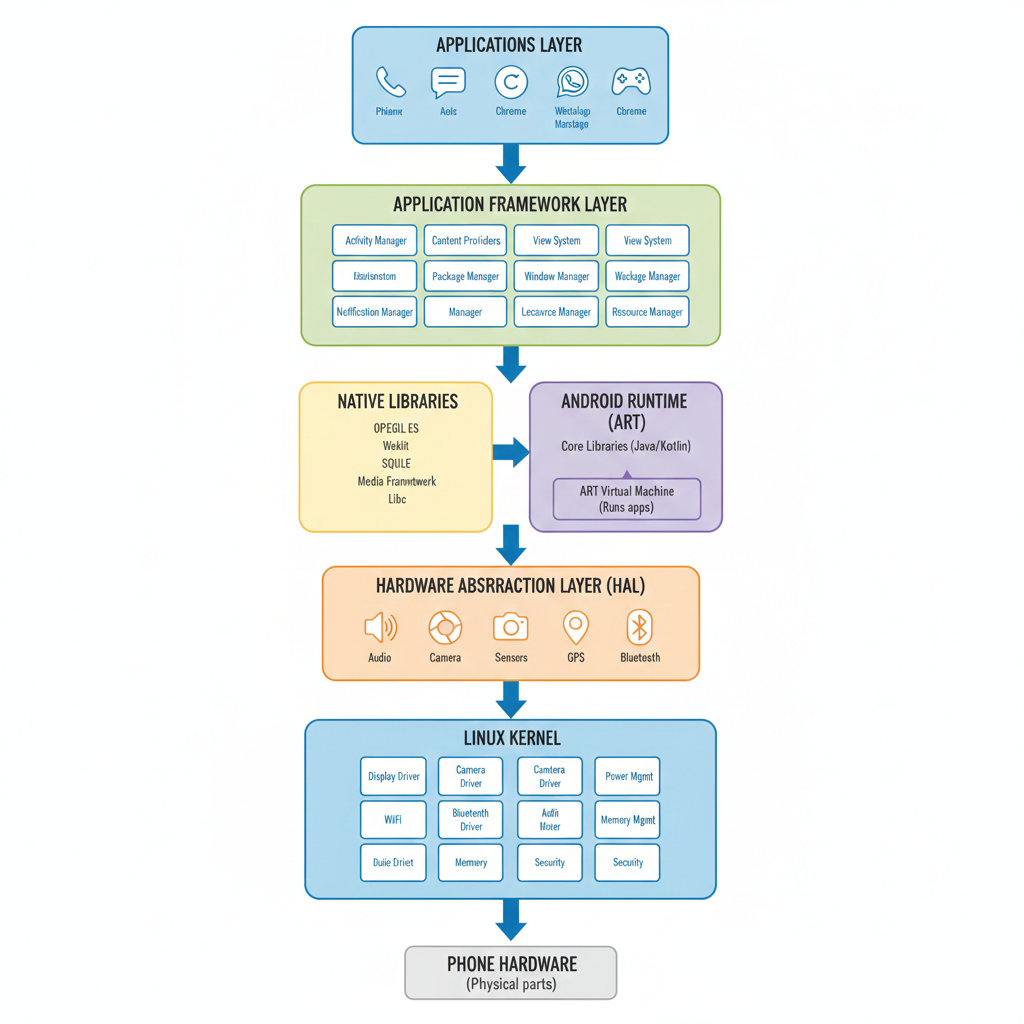
What is Android Architecture?
Think of Android like a multi-story building. Each floor has a specific job, and they all work together to make your phone function. The bottom floors (foundation) handle the heavy technical work, while the top floors are what you actually see and touch.
Android has 5 main layers stacked on top of each other:
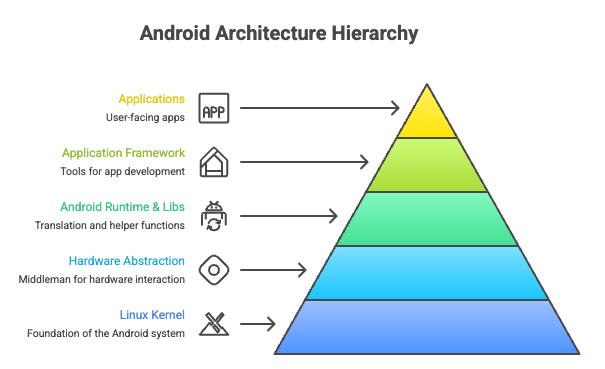
Let's explore each layer from bottom to top!
LAYER 1: Linux Kernel (The Foundation)
What is it?
The Linux Kernel is the very bottom layer - the foundation of everything. It's like the building's basement where all the pipes, electrical wiring, and support beams are.
What does it do?
It directly talks to your phone's hardware (the physical parts) and manages all the basic operations.
Key Jobs:
1. Memory Management
- Decides which apps get how much RAM (memory)
- Like a librarian deciding who gets which books
- If you open too many apps, it kills older ones to free up space
2. Process Management
- Runs multiple apps at the same time
- Decides which app gets to use the processor when
- Like a traffic cop directing cars
3. Device Drivers
- Connects to hardware: camera, screen, speakers, battery, GPS, Wi-Fi, Bluetooth
- Each piece of hardware has a "driver" (instruction manual for how to use it)
- Example: Camera driver tells the camera how to take photos
4. Security
- Each app runs in its own protected space (like separate apartments)
- Apps can't steal data from other apps
- Protects the system from malicious apps
5. Power Management
- Controls battery usage
- Puts hardware to sleep when not needed
- Decides when to charge, when to save power
Simple Analogy:
The kernel is like a building manager who:
- Controls electricity, water, heating
- Decides who can enter which rooms
- Keeps everyone safe
- Makes sure everything runs smoothly
LAYER 2: Hardware Abstraction Layer (HAL)
What is it?
HAL is the middleman between the hardware and the software above it.
Why do we need it?
Different phones have different hardware:
- Samsung uses Samsung cameras
- Google Pixel uses Google cameras
- OnePlus uses different cameras
HAL makes sure apps don't need to worry about these differences!
How it works:
Without HAL:
- Camera app would need different code for each phone model
With HAL:
- Camera app asks HAL: "Take a photo"
- HAL translates this request for the specific camera hardware
Components of HAL:
- Audio HAL - Handles speakers, microphones, headphones
- Camera HAL - Manages camera hardware
- Sensor HAL - Gyroscope, accelerometer, proximity sensor
- GPS HAL - Location services
- Bluetooth HAL - Bluetooth connections
- Graphics HAL - Display and GPU
Simple Analogy:
HAL is like a universal translator:
- Apps speak one language ("Take a photo")
- Different cameras speak different languages
- HAL translates so everyone understands each other
LAYER 3: Native Libraries & Android Runtime
This layer has two main parts working side by side:
Part A: Native C/C++ Libraries
What are they? Pre-built code packages that do common tasks super fast. Written in C/C++ languages (faster than Java).
Major Libraries:
1. OpenGL ES (Graphics)
- Draws 3D graphics
- Used in games like PUBG, Call of Duty Mobile
- Makes animations smooth
2. WebKit/Blink (Web Browser Engine)
- Displays web pages in Chrome
- Renders HTML, CSS, JavaScript
3. SQLite (Database)
- Stores app data locally
- Like Excel for your phone
- Example: WhatsApp stores all your chats here
4. Media Framework
- Plays videos (MP4, MKV)
- Plays music (MP3, FLAC)
- Records audio/video
5. SSL (Security)
- Encrypts your data when browsing
- Keeps passwords safe
- HTTPS connections
6. Libc (Core C Library)
- Basic math, text operations
- Used by almost everything
7. Surface Manager
- Controls what appears on screen
- Combines layers (notification + app + wallpaper)
8. FreeType
- Renders fonts (makes text look good)
Part B: Android Runtime (ART)
What is it? ART is the engine that runs your apps. It's like the engine in a car.
How it works:
Apps are written in Java/Kotlin → These languages can't run directly on phones →** ART converts them to machine code the phone understands
Two Android Runtime versions:
1. Dalvik (Old - used until Android 4.4)
- JIT (Just-In-Time) compilation
- Converts code WHILE the app is running
- Slower, used more battery
2. ART (Current - Android 5.0+)
- AOT (Ahead-Of-Time) compilation
- Converts code WHEN YOU INSTALL the app
- Apps run 2x faster
- Better battery life
- Apps take slightly more storage space
Simple Analogy:
- Libraries = Tools in a toolbox (hammer, screwdriver, saw)
- ART = The carpenter who uses those tools to build things
- Apps ask ART to do work, ART uses libraries to get it done
LAYER 4: Application Framework
What is it?
This is the toolkit for app developers. It provides ready-made building blocks so developers don't have to build everything from scratch.
Key Components:
1. Activity Manager
- Manages app screens (activities)
- When you open an app, it creates an activity
- When you press back, it destroys that activity
- Handles app lifecycle (start, pause, resume, stop)
Example:
- You open Instagram → Activity Manager creates Instagram's home screen
- You press Home button → Activity Manager pauses Instagram
- You return → Activity Manager resumes it
2. Content Providers
- Share data between apps
- Like a librarian who lets apps borrow data
Example:
- WhatsApp can access your Contacts
- Instagram can access your Photos
- Without exposing all your data to these apps
3. View System
- All the UI elements: buttons, text boxes, images, lists
- What you actually see and touch
Components:
- TextView (displays text)
- Button (clickable button)
- ImageView (shows images)
- RecyclerView (scrollable lists)
- EditText (text input)
4. Notification Manager
- Shows notifications at the top
- Controls notification sounds, vibrations
- Manages notification channels (categories)
5. Package Manager
- Installs/uninstalls apps
- Keeps track of all installed apps
- Manages app permissions
6. Window Manager
- Controls windows on screen
- Handles split-screen mode
- Manages picture-in-picture
7. Telephony Manager
- Handles phone calls
- Manages SIM card info
- Controls mobile data
8. Location Manager
- GPS location services
- Gives apps your location (with permission)
9. Resource Manager
- Manages app resources:
- Images, icons
- Text strings
- Colors, themes
- Layouts for different screen sizes
10. WiFi/Bluetooth Manager
- Controls WiFi connections
- Manages Bluetooth pairing
Simple Analogy:
The Application Framework is like a LEGO set:
- Instead of making each LEGO brick from scratch, you get pre-made bricks
- You just assemble them to build your creation (app)
- Makes building much faster and easier
LAYER 5: Applications
What is it?
This is the top layer - what you actually see and use! All the apps on your phone.
Two types of apps:
1. System Apps (Pre-installed)
- Phone dialer
- Messages (SMS)
- Camera
- Clock
- Settings
- Contacts
- Chrome browser
- Gmail
- Google Maps
- Calculator
These come with Android and can't usually be uninstalled.
2. User Apps (You install these)
- Games
- TikTok
- Spotify
- Netflix
- Any app from Play Store
How apps work:
- You tap an app icon
- Activity Manager starts the app
- ART runs the app's code
- App uses Framework tools (buttons, notifications, etc.)
- Framework uses Native Libraries (graphics, database, etc.)
- Libraries use HAL to access hardware
- HAL talks to Linux Kernel
- Kernel controls the actual hardware
All this happens in milliseconds!
How Everything Works Together - A Real Example
Example: Taking a Photo with Instagram
Let's trace what happens when you tap the camera button in Instagram:
Step 1: You tap the button
- Layer 5 (Instagram app): Detects your tap
Step 2: Instagram asks for camera
- Layer 4 (Framework): Activity Manager creates camera activity
Step 3: Request camera hardware
- Layer 3 (Native Libraries): Camera library prepares to capture
Step 4: Access camera
- Layer 3 (ART): Runs the camera code
Step 5: Talk to camera hardware
- Layer 2 (HAL): Camera HAL translates the request for your specific camera
Step 6: Activate camera
- Layer 1 (Kernel): Camera driver turns on the camera sensor
Step 7: Capture image
- Camera hardware captures light → sends data back up through all layers
Step 8: Process image
- Layer 3: Image processing libraries enhance the photo
- Layer 3: SQLite stores the photo data
- Layer 4: Content Provider saves to gallery
- Layer 5: Instagram displays the photo
All of this happens in under a second!
Android Architecture Diagram